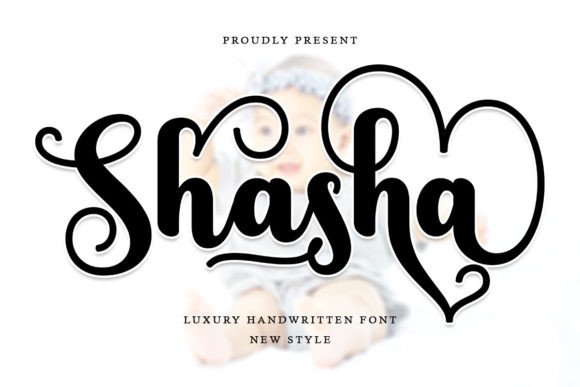
Shasha: A Stylish Handwritten Font for Web Design
Working on a boutique online store project, I was looking for a font that could add a touch of elegance without sacrificing clarity. Shasha, a flowing handwritten script font from the Script Amp collection, caught my eye. Its varied baselines and smooth lines felt just right for a brand that wanted to feel both modern and personal.
Testing Shasha in the hero section of the site, I was immediately struck by its natural rhythm. The glyphs looked handcrafted but still maintained a clean, professional edge. It wasn’t too ornate or difficult to read, which made it perfect for headlines and call-to-action buttons. Even when placed over an image banner, the font stood out without overpowering the background.
The Visual Personality of Shasha
Shasha has a distinct personality—soft yet confident. It carries a subtle calligraphic influence that gives it a timeless feel, while its modern structure keeps it feeling current. This balance makes it ideal for brands that want to communicate creativity and sophistication without being overly formal.
When used in headers or section titles, Shasha adds visual interest without disrupting the flow of content. It’s especially effective when paired with simpler fonts for body text. For example, using a clean sans serif like Open Sans alongside Shasha helped maintain readability while letting the script font shine in key areas.
Real-World Applications for Shasha
On a coaching website, I used Shasha for the main headline and subheadings. The font’s fluidity gave the site a warm, inviting tone that matched the brand’s mission. In a product landing page, it worked well for short phrases like “Discover Your Potential” or “Start Today.”
For a digital brand kit, Shasha became the foundation of the logo design. Its alternates and stylistic variations allowed for a custom look that felt unique yet cohesive. On a course sales page, it added a personal touch to testimonials and feature highlights, making the content more engaging.
Readability and Layout Considerations
One of the first things I checked was how Shasha performed on mobile screens. At smaller sizes, it remained legible, though I avoided using it for long paragraphs. Instead, I reserved it for short, impactful text like CTA buttons or section headings.
On dark backgrounds, Shasha retained good contrast, but I found that lighter shades of the font worked better for high-contrast situations. When overlaying text on images, I adjusted the opacity slightly to ensure the font didn’t get lost in busy visuals.
For fast-loading pages, I made sure to optimize the font files and use only the necessary weights. Shasha’s webfont availability and file formats made it easy to integrate without slowing down the site.
Font Pairing and Brand Consistency
Pairing Shasha with a simple serif or sans serif font created a balanced design. For a more editorial feel, I combined it with a serif like Lora. For a minimal, modern look, a sans serif like Montserrat worked well. These pairings helped maintain visual hierarchy while allowing Shasha to stand out where it mattered most.
When working on a portfolio homepage, I used Shasha for the title and a few key headings, while keeping the body text in a more neutral typeface. This approach kept the design cohesive and ensured that the font supported the overall brand identity rather than competing with it.
Practical Tips for Using Shasha
Before finalizing the font for a project, I always check the available styles, alternates, and multilingual support. Shasha includes a range of glyphs that make it versatile for different languages and design needs. Its commercial font licensing also made it easy to use across multiple platforms and client projects.
For small buttons or navigation menus, I used a bolder weight of Shasha to ensure visibility. In decorative accents, like social media graphics or blog headers, the lighter styles added a refined touch without overwhelming the design.
Overall, Shasha is a powerful tool for any web designer or digital creator looking to add a personal, elegant touch to their work. Whether you're building a creative portfolio, launching a coaching site, or designing a product landing page, this font offers both style and functionality.
As I wrapped up the project, I knew Shasha had played a key role in shaping the brand’s voice. It wasn’t just a font—it was a design choice that helped bring the vision to life. For anyone looking to elevate their digital presence, Shasha is definitely worth considering.